How analytiQa Works
A high-level look at how your data moves from Jira, qTest, and Tosca into your dashboards.
Overview
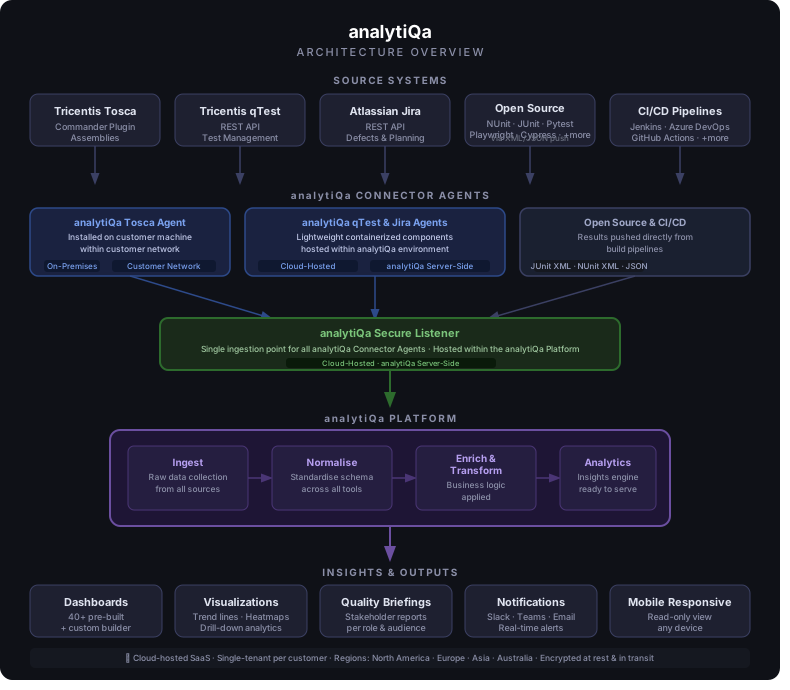
- Connector Agents — For Jira and qTest, a lightweight component hosted in your analytiQa environment pulls data from your instance on a recurring schedule. For Tosca, an agent runs on a machine within your network, since it needs local access to your Tosca workspace. Or skip agents entirely and push results straight from CI/CD or another tool — see Publishing Test Results Directly.
- Secure Listener — A single, secure ingestion point that all connector agents and direct publishers send data to.
- Platform — Your data is ingested, normalised into a standard schema, enriched (e.g. calculated fields like urgency or complexity scores for Jira), and indexed for fast search and aggregation.
- Insights & Outputs — Pre-built and custom dashboards, visualizations, stakeholder briefings, and notifications. See Using Dashboards.
Your Data Is Isolated
Every customer's data is logically separated — you only ever see your own data, and dashboards are provisioned per customer.
Hosting
analytiQa is run as a managed SaaS platform:
| Aspect | Summary |
|---|---|
| Hosting | Managed cloud infrastructure, monitored by analytiQa |
| Encryption in transit | All connections use HTTPS/TLS |
| Secrets & credentials | Encrypted at rest; never logged |
| Updates & maintenance | Handled by analytiQa — no action needed from you |
We don't publish the specific internal tools and infrastructure behind each stage of the pipeline above — if you have a security questionnaire or vendor-assessment requirement, contact support and we'll work through it with you directly.
Questions?
See Support & Troubleshooting or your Configuration Checklist to get set up.